
How can we help?
Pay-As-You-Go Features And Prices
A detailed list of which features aren’t included in the base subscription price and how to track your usage and payments.
All prices are in USD.
Some of the features inside Fern CRM are billed separately from your monthly payment for 2 reasons:
- We recognize that how much any one business uses any of these features will vary greatly. We don’t want to increase the price of the base subscription to cover these costs and we don’t want to go out of business by undercharging how much it costs to use these features.
- Some of the features ~ the ones that use A.I. ~ come with a bigger environmental cost. So we want to make sure we’re offsetting the additional energy used and pollution created without charging users who don’t use AI.
Our goal is to keep Fern CRM accessible to as many change makers as possible. Which is why we don’t just bake these extra costs into every account.
This page lists each of the pay-as-you-go (PAYGO) features and exactly how much you pay when you use them.
But don’t worry, all of these features come out of your prepaid wallet balance. Your card won’t be charged unless you activate any of these features. (For example, setting up your email settings will add $10 to your Wallet Balance to cover the cost of sending emails. You won’t be charged again until your balance dips below the number you specify.)
Please note:
The account owner (the person who pays for the Fern CRM account you’re using) is 100% responsible for the full payment for any and all pay-as-you-go features used in that account, whether or not the individual users or account owner understands how the pricing works. There are no refunds for any charges accrued from the use of these features. We are happy to share more info and answer questions relating to these features. Just reach out to us directly or post in the community.
Pay-As-You-Go Prices
The following prices are subject to change and we have little to no control over price changes.
We simply pass the cost onto you and report the current prices.
Unless otherwise noted, the specific price per unit is the actual price deducted from Your Wallet Balance each time you use that feature. The estimate for how many units you get per $10 is only an estimate based on a normal calculation. It might not always be accurate based on your actual usage.
Emails
Cost per email sent: $0.0007/email
$10 will give you approximately: 14,285 emails
The cost per email sent includes any email sent from your account, by any user with access to your account, including automated emails sent from workflows, marketing emails sent from the Email Marketing tab, personal emails sent from the omnichannel inbox, and anywhere else in Fern CRM that an email can be sent.
The cost is per individual email. So if you send 1 bulk email to your entire list of 1,000 subscribers, it costs the same as sending 1,000 emails to 1 person or 20 emails to 50 people. Your account is charged based on emails sent, not emails opened.
Text Messages
Cost per text segment sent: $0.0091/segment
$10 will give you approximately: 1100 segments
Message segments are how the SMS industry as a whole counts messages.
The number of segments needed to send a text message is based on how long the message is. A short, one-sentence text message would usually be one segment.
If you’re old enough to remember what it was like texting on cell phones before smart phones existed (or early Twitter days), you’re probably pretty familiar with how long a segment is. It used to be 160 characters, give or take a few.
For more information about what constitutes a segment, check out this easy-to-read article by Twilio, the “phone engine” that powers Fern CRM’s phone and text features:
https://www.twilio.com/en-us/blog/what-the-heck-is-a-segment-html
Phone Calls
Making calls: $0.0154/min
$10 will give you approximately: 649 mins
Receiving calls: $0.0094/min
$10 will give you approximately: 1063 mins
Pretty self-explanatory. Works like any phone plan.
WhatsApp Conversation
Receiving inbound messages and replying with free text in the conversation window is completely free. Initiating outbound messages incurs the following costs:
$15/month plus the cost of messages delivered.
Opening a conversation: $0.0814/delivered message
$10 will give you approximately: 122 delivered messages
WhatsApp conversations are charged based on a per-message pricing model. Your Wallet is charged for each delivered message.
Please note: We have zero control over WhatsApp pricing and we agree it’s more confusing than anything else in the Fern CRM ecosystem. So we’ll do our best to explain the prices and help you get the lowest prices, but in the end, you’re 100% responsible for any charges that result from your usage of this feature.
WhatsApp charges different prices for different types of conversations that also changes based on which country the message is delivered to. The prices listed here reflect the base rate for marketing templates in the UK. However, the final cost for you might be different due to two factors:
Conversation Category: The type of conversation the template is used for may affect the price.
Country/Region Rate: Depending on where the WhatsApp message is being sent
Messages are categorized into Marketing, Utility, Authentication, and Service types — each with its own pricing logic and strategic use cases. Understanding these message types and how they’re triggered is essential for optimizing spend and delivering timely, relevant communication to your customers.
By aligning your outreach with these categories, you can take full advantage of cost-saving opportunities (like free utility messages within an open customer service window) while maintaining high-quality engagement.
- Marketing Messages
Definition: Outbound promotional messages sent to users, such as product offers, announcements, and re-engagement campaigns.
Pricing: Charged per delivered message, regardless of customer service window status.
Use Case Examples: Sales promotions, event invitations, abandoned cart reminders.
- Utility Messages
Definition: Transactional messages that relate to a specific, agreed-upon transaction or update.
Pricing: Charged per message when sent outside an open customer service window. Free if delivered within an active 24-hour customer service window initiated by the user.
Use Case Examples: Order confirmations, shipping updates, appointment reminders.
Because of the many different scenarios related to how WhatsApp conversations are charged, please reach out to us directly to discuss any questions or concerns you have before using this feature. The account owner (the person paying for your Fern CRM account) is 100% responsible for all PAYGO charges accrued, whether you understand the billing structure or not. We are happy to share more details and answer all questions, just reach out!
Premium Triggers & Actions Inside Workflows
Cost per premium action: $0.0105/execution
$10 will give you approximately: 950 workflow premium actions
This is one of those features that many business owners will never need, and therefore isn’t baked into the monthly subscription.
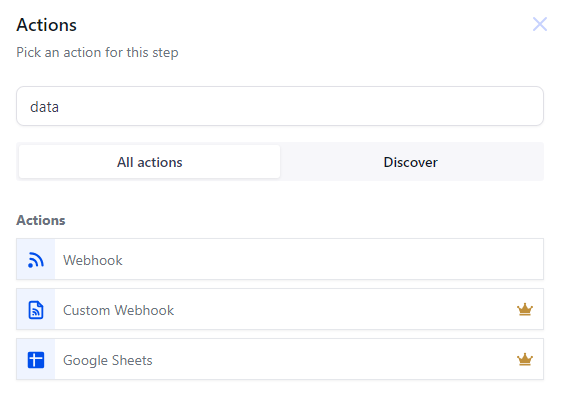
Premium triggers and actions are available inside the Workflows (automations). They’re easily identified by a little crown icon next to a specific trigger or action:
The yellow crown icon to the right of “Custom Webhook” and “Google Sheets” indicates that those 2 actions cost extra, while the regular “Webhook” action does not.
Email Verification
Verifying contact email addresses: $0.0028/email verification
$10 will give you approximately: 3570 email verifications
This feature is available in your Business Profile Settings:
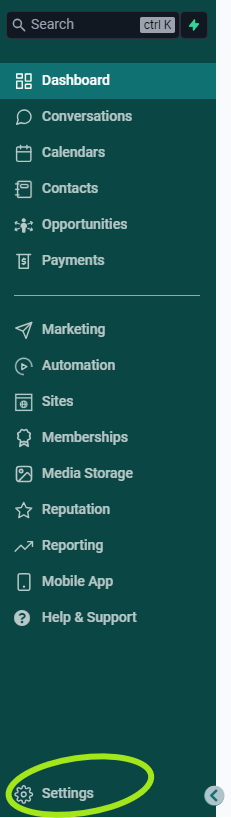
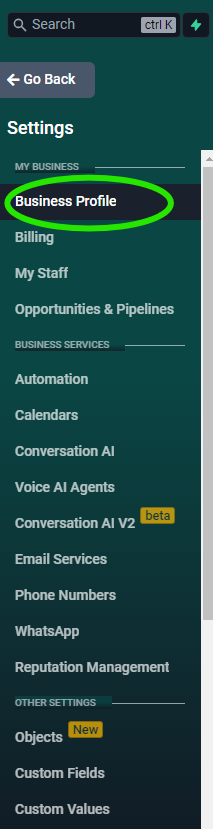
First click Settings in your left sidebar, then click Business Profile in the left sidebar of the Settings side of your dashboard:
Once you’re in your Business Profile settings, scroll down until you see this section:
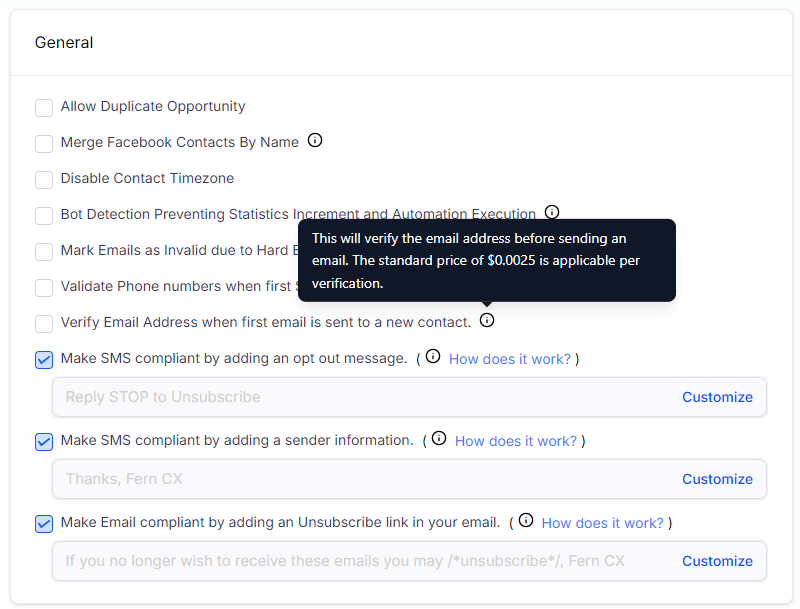
When you hover over the little “i” inside a circle next to each feature, it will open a “tool tip” with more info about that feature. The tool tip for “Verify Email Address” will show the current price that your account will be charged when this feature is used.
This feature is off (unchecked) by default. If you add a check to the checkbox, it will turn this feature on and the PAYGO price will be deducted from Your Wallet Balance whenever it is used.
Auto-Complete Address
Auto-completing addresses: $0.0033/ Search Result and $0.0057 / Result Selection
$10 will give you approximately: 3030 Search Result or 1730 Result Selection
This is another feature that many Fern CRM users will never need or use, so we charge it separately to benefit those who need it.
A.I. Features
All A.I. features are pay-as-you-go because some businesses choose not to use A.I. for environmental or ethical reasons. Whatever you decide is right for your business and brand style, you have the option to pay for the features you use and save on the features you don’t use. Part of your payment to use these features is spent on offsetting the extra pollution they create.
PLEASE NOTE: we also have a flat-rate unlimited monthly plan for $125/month which applies to most of the following AI usage.
Content AI
Using Content AI: $0.135/1000 words and $0.09/ Image
$10 will give you approximately: 74,075 words OR 110 Images
Workflow Assistant AI
Input: $1.08 for 750,000 words
$10 will give you approximately: 6,944,444 words
Output: $4.32 for 750,000 words
$10 will give you approximately: 1,736,111 words
This has changed from the previous pricing model which was:
Using Workflow AI: $0.033/GPT 4 and 4o execution and $0.0165/ GPT 3.5 & 4o Mini executions
$10 will give you approximately: 305 GPT 4 and 4o execution or 605 GPT 3.5 & 4o Mini executions
We’re leaving this legacy pricing here in case any of our Founder’s accounts are still impacted by the previous pricing model or still seeing these prices in the itemized Wallet transactions from before the price change.
Conversation and Voice AI
$0.03/Message and $0.195/ Minute voice call
$10 will give you approximately: 335 Message or 50 Minute voice calls
This has changed from the previous pricing model which was:
Using Conversation AI: $0.022/Message
$10 will give you approximately: 455 Messages
We’re leaving this legacy pricing here in case any of our Founder’s accounts are still impacted by the previous pricing model or still seeing these prices in the itemized Wallet transactions from before the price change.
Reviews AI
Using Reviews AI: $0.015/review response
$10 will give you approximately: 665 review responses
The price for Reviews AI has gone down significantly in 2025, so Founders might notice they were charged more in the previous pricing model. This is not a mistake, it’s a rare instance of things getting cheaper!
Funnel & Website AI
Using Funnel AI: $1.485/funnel AI
$10 will give you approximately: 5 funnel AI
AI Employee
AI Employee includes unlimited* use of:
- AI Agents
- Content AI
- Workflow Assistant AI
- Conversation & Voice AI
- Reviews AI
- Funnel & Website AI
The Agent Studio, Voice AI Widget, and Voice AI Outbound services are not covered by the Unlimited plan. Usage of these services will be charged under the Pay-Per-Use plan.
AI Employee is available for a flat-rate of $125/month or the following “pay for what you use” prices:
AI Employee & Agent Studio Pay-Per-Use price: $0.45/750,000 Words
$10 will give you approximately: 15,000,000 words
Actual charges are based on tokens and the prices vary greatly between the different services. The word counts shown above are estimates to help you understand usage and are based on GPT-4o Mini as an example. Actual charges may vary.
We’re happy to share more details on specific pricing, just get in touch! We didn’t share more details here because the pricing model has so many variables and changes as the technology evolves. So it’s easier to just look it up on a case by case basis as needed.
*HighLevel (the software that powers Fern CRM and includes all these AI features), has what’s called “Excessive Use Restrictions” which allows them to determine, at their sole discretion, any use of the platform that seems excessive, abusive, or illegal (like spamming people.) If your usage of the AI features triggers this Excessive Use Restriction, HighLevel has the right and power to throttle, limit, or terminate your access to those features. I just wanted to be clear about the meaning of “unlimited” here, because Fern CRM does not condone or allow spammy or abusive business practices AND this is not something that Fern CRM has any control over. We will not refund any money spent on either the AI features or your Fern CRM subscription if you’re affected by these restrictions.
Additional, Optional Add-Ons & Plans
Fun Fact: The following add-ons can be hidden from your account if you simply don’t want them and want to declutter your dashboard. We can always add them back at any time in the future. Everything else is a core feature of Fern CRM:
- Branded Client Portal App
- Listings
- Fully hosted WordPress (different than the free, built-in blog feature)
- AI Employee
- SEO by Search Atlas
- Workflow Pro
- Dedicated IP
- Ad Manager
If you’d like to stop seeing any of these features inside your dashboard, send us a message and we’ll toggle them off on our side.
In addition to the Pay-As-You-Go features, we also have a few optional “pay-if-you-need-them” features:
Dedicated IP for emailing
$70.80 per IP per month
For those who rely on the cleanest email reputation possible and send a large volume of emails each month (either a large list, many emails per month, or both), a dedicated IP is the next step.
We weren’t kidding when we said Fern CRM would grow with you as your business grows!
Reach out anytime and our team will set this up for you and you’ll continue to enjoy your email pollution being offset while you grow your impact, income, and influence!
Workflow Pro Plans
If you use the premium workflow features a lot, you might benefit from a “bulk rate” with our Workflow Pro Plans. Look at the following rates and see if you’d save money with a Pro Plan. Each plan comes with a set number of executions per month and an overage rate you’ll be charged if you use more than the included number that month.
| Plan name | Monthly price | Executions per month | Overage rate |
|---|---|---|---|
| Free | Free | 100 free lifetime executions | $0.01 / execution |
| Starter | $13/month | 10,000 | $0.008 / execution |
| Growth | $33/month | 30,000 | $0.006 / execution |
| Scale | $65/month | 65,000 | $0.004 / execution |
Branded Client Portal App
$70/month
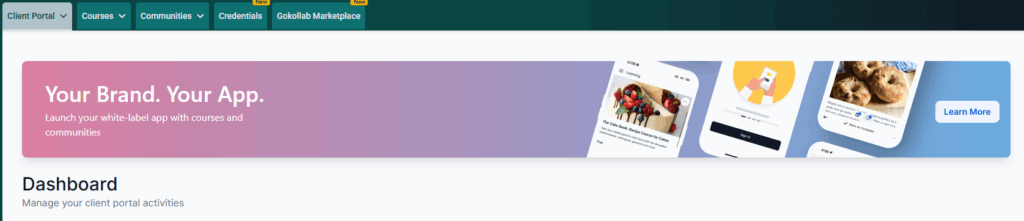
If you want your courses, communities, and client portal to have its own app in the App Stores, with your branding instead of LeadConnector, GoKollab, or Fern CRM ~ this is how you get it!
Just open the Memberships section of your CRM dashboard and click the link in the banner to get started:
Listings
Monthly plans start at $50/month
Listings is a is a local SEO platform integrated into the Fern CRM ecosystem. It helps multi-location businesses ensure accurate, real-time presence across search engines, directories, maps, and apps. It enables agencies and businesses to sync accurate business information across multiple online directories—like Google, Bing, Yelp, and more—ensuring greater visibility and local search accuracy. Keeping business information consistent across online directories is crucial for SEO and customer trust.
| Monthly plan | 6-Month plan (2 months free) | Annual plan (2 months free) |
|---|---|---|
| $50/month | $251/every 6 months | $501/year |
Fully Hosted WordPress
$15/month with basic storage limits and the option to pay an additional $12/month per 25 GB of additional storage needed.
This is a more advanced version of the free, built-in blog. The free, built-in blog is based on WordPress but it’s a streamlined version that makes blogging simple.
With a fully-hosted WordPress blog, you get access to many of the features that make WordPress #1 for SEO (including themes, plugins, backups, and more), giving you more control over the different aspects of your blog. This is of course totally optional!
Your Wallet
All PAYGO usage is deducted from your prepaid Wallet Balance which can be found inside your Billing settings.
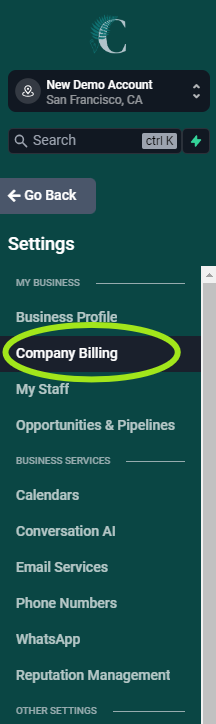
Inside your Fern CRM billing settings is a tab called “Wallet & Transactions”:
The screenshot shows “Company Billing” but it has been shortened to just “Billing” now.
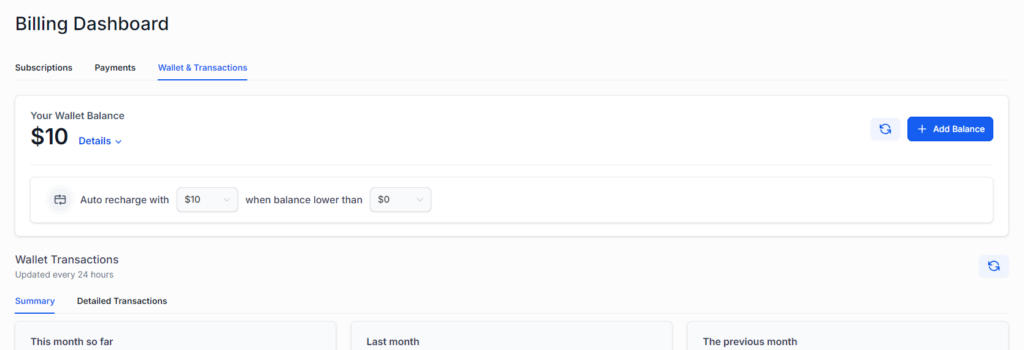
The top of the Wallet & Transactions dashboard looks like this:
Your Wallet Balance
As you can see in the screenshot above, “Your Wallet Balance” shows how much is currently in your wallet. If your account has any “complimentary credits” they are included in your balance. Click the blue “Details” to see how much comes from your complimentary credits versus how much has been charged to your credit card.
Your balance will automatically refill, based on what you set in the box below your balance:
Your card will be automatically charged whatever you have set in the first dropdown box anytime “Your Wallet Balance” drops below whatever you have set in the second dropdown box.
Please note: In some cases, your card may be charged in $10 or $20 increments until it reaches the auto recharge amount. It’s not common and it’s annoying, but relatively harmless unless your bank flags it as fraud. For example, if you choose to auto recharge with $100, there’s a chance you might see 10 separate charges for $10 each. If this happens, please don’t be alarmed, and if prompted, please approve the charges.
Wallet Transactions
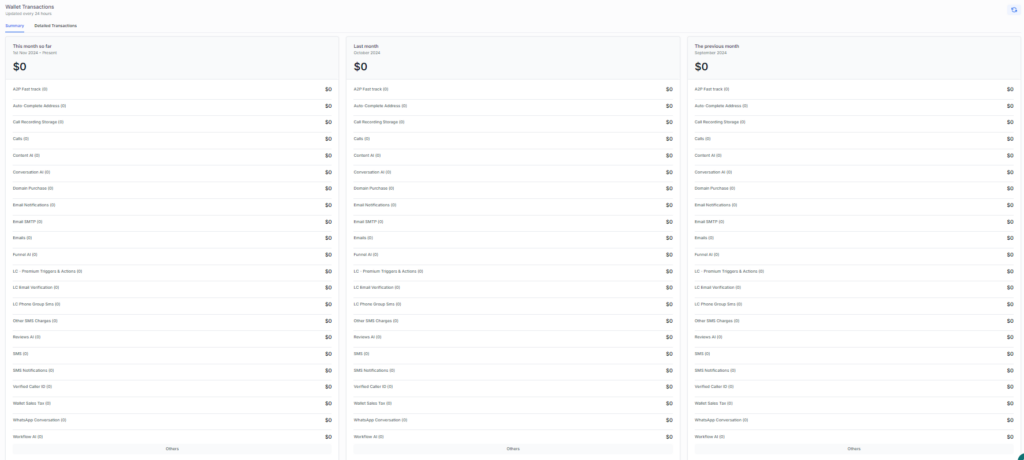
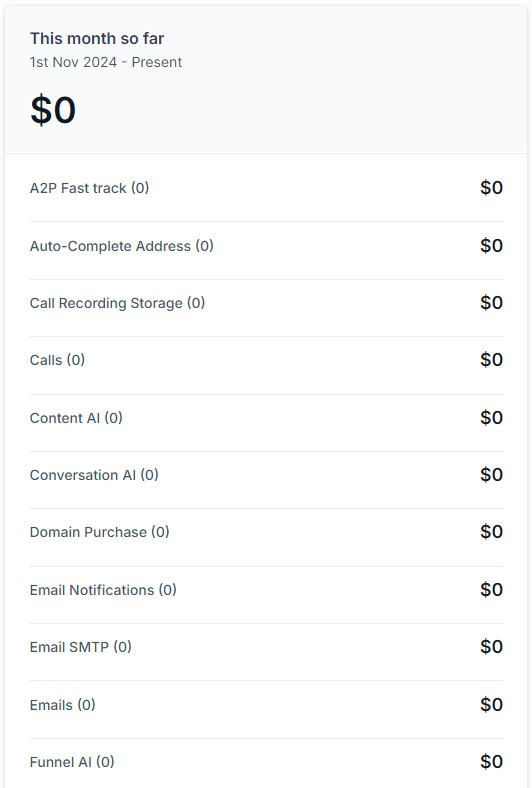
In the next section down, you’ll see your Wallet Transactions which are updated daily.
The summary includes a list of all the PAYGO features you’ve used during the current month, last month, and the previous month in 3 columns from left to right.
Here’s what the full list looks like, zoomed out:
And here’s what the top of the list looks like, zoomed in:
Detailed Transactions
If you click on “Detailed Transactions” (next to “Summary), you’ll see an itemized list of each PAYGO feature you’ve used, including dates and reference numbers. You’ll also see the dates and amounts for any refills you’ve made to Your Wallet Balance.
Impact & Giving Back
Fern CRM is dedicated to making the world cleaner and safer while boosting ethical business practices. In addition to the impact created by your monthly payments to use Fern CRM (which you can track in your Impact Tracker), your use of the pay-as-you-go features also makes a difference.
For every $10 you pay for PAYGO features, Fern CRM:
Removes 60 kg of carbon
Donates 40 cents to social and environmental causes
If you’re paying $100/month for PAYGO features, then we’re removing 600 kg of carbon and donating $4 to make the world a better place.
No matter how much or how little you use these pay-as-you-go features, Fern CRM is making sure your actions are greener, cleaner, and safer for people and the planet.
At this time, we don’t have a way to include this part of your impact in your Impact Tracker, but our accounting team is careful to make sure every dollar is divvied up correctly so that ALL of our revenue is included when making donations and carbon removal.