
How can we help?
How To Downgrade Your CRM Subscription To A Smaller Plan
First of all, we totally understand, no matter what your reasons are!
We’re actually thrilled you want to keep using Fern CRM and being part of this community. 🥳
The smaller plan is exactly the same as the full-priced plan except:
- Your contact list is limited to 2000 contacts
- You only get 2 logins (you and one team member)
- Your price isn’t locked in (we don’t plan to increase the price, but, unlike the full-price plan, it isn’t locked in at that price and could change in the future.)
These limitations are the only way we can ethically offer a plan for less than full-price without putting our own business at risk in the future.
Step 1: Open Your Fern CRM Billing Settings
Inside your Fern CRM dashboard, click “Settings” in the left sidebar menu.
Once you’re in the Settings menu, choose “Billing” in the left sidebar.
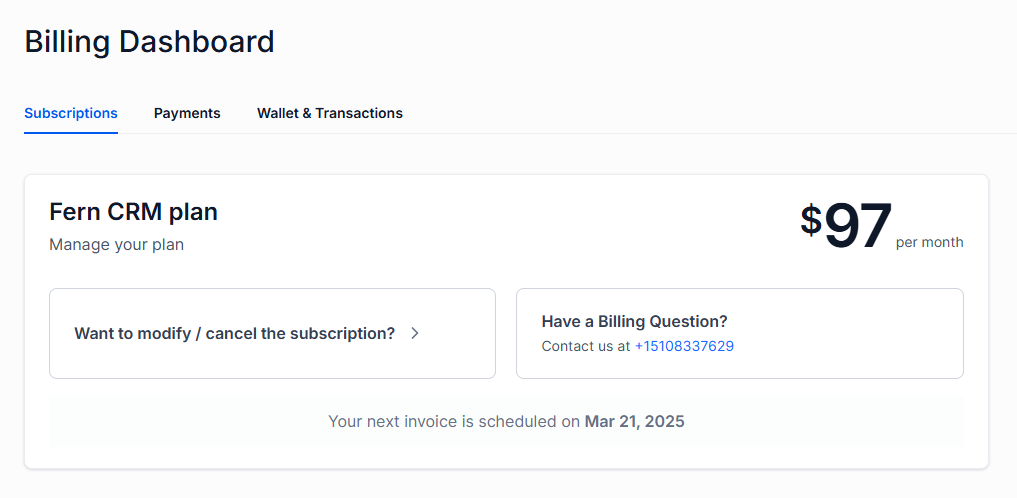
You’ll see information about your current CRM plan at the top of the Billing page:
Open the Subscription Options
Click the button that says, “Want to modify / cancel the subscription?” This will open a pop-up box with subscription options that looks like this:

Choose “Downgrade Plan” (the 2nd button from the top.)
From there, just follow the prompts to instantly downgrade your plan to our “Leaf” plan.
If you have any questions or feel unsure, reach out right away and we’ll assist!