
How can we help?
How To Create And Use Coupon Codes
We’ll add a full tutorial here soon, but in the meantime, we wanted to document this new feature that lets your customers get a product for free without needing to enter credit card info.
First, create a coupon code for 100% off or a dollar amount discount.
Then, open the funnel where the discounted products are sold and open the Settings for that funnel.
There is a toggle switch called, “Require credit card” that’s enabled by default:
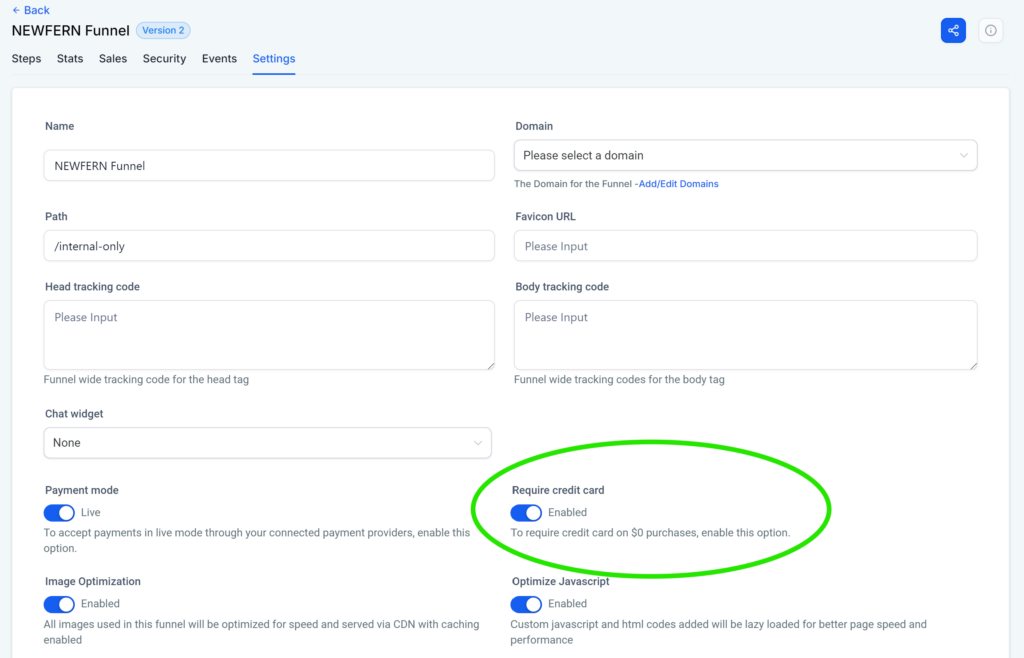
If you want your customers to be able to use a coupon code and NOT enter their credit card info, then toggle this off.
Now you’re ready to give free access to your paid products without having to do any extra work on your end to manually add people to your programs, products, and/or automations.