
How can we help?
How To Cancel Your Fern CRM Account
Without talking to anyone…
Need to cancel your CRM account?
We’re sad to see you go but we also want you to use the tools that are BEST for your business and success.
So we’re going to celebrate your growing success and hope you’ll keep in touch! 🎊🎊🎊
First, disconnect & prep your CRM account for cancelation
Before you cancel, make sure to disconnect it from the things you’ve integrated and stop and delete your automations.
Disconnect your social media accounts, Stripe, Paypal, and other payment processors. Delete all your workflows.
In most cases, there’s a grace period of up to 30 days between when you cancel and when your account is permanently deleted and deactivated and we’re not responsible for anything still running in your account after you lose access. So it’s best to delete and disconnect before you cancel.
You don’t want emails to continue sending to your clients if you don’t have access to the replies and things like that!
Cancel from within your Fern CRM dashboard
Inside your Fern CRM dashboard, click “Settings” in the left sidebar menu.
Once you’re in the Settings menu, choose “Billing” in the left sidebar.
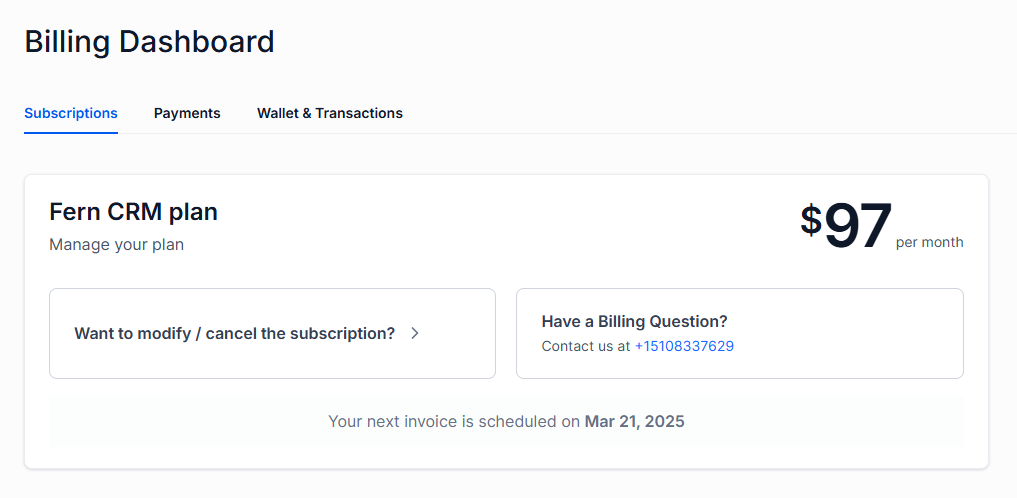
You’ll see information about your current CRM plan at the top of the Billing page:
Open the Subscription Options
Click the button that says, “Want to modify / cancel the subscription?” This will open a pop-up box with subscription options that looks like this:
NOTE: the way the popup looks has changed. We’ll add updated images soon. But it’s very intuitive, just follow the prompts and make your selections.
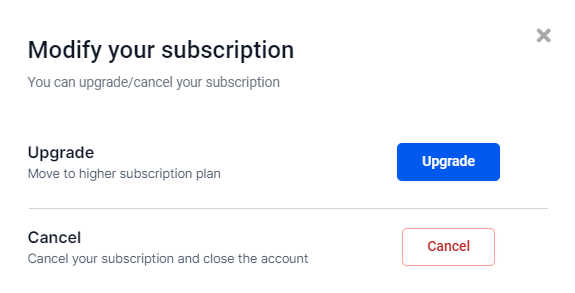
Click the “Cancel” button to begin the cancelation process.
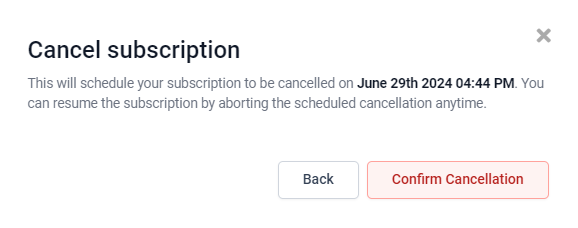
When You Will Lose Access
As you can see, it lists the exact time your access will end. You can undo the cancelation and keep your access by going through the same steps again, before your access expires.
You will receive a cancelation confirmation email from us when your subscription has ended.
Share Feedback?
We’d LOVE to know why you decided to cancel so we can help future business owners who might be considering Fern CRM.
Just click the “C” logo in the bottom right of any website page (or use the chat feature inside your Fern dashboard) to let us know the good, bad, ugly, and everything else! We promise to keep it confidential and not hold it against you.
Or, you can fill out this totally anonymous feedback form here: Cancelation Feedback Form
As ethical business owners we totally understand that not every tool is right for every business and we want you to save your money for the tools that work for you.
So go ahead, let us know what made the difference for your decision!