
How can we help?
How To Test Your Sales Funnels
Before sharing the link to any sales page, checkout page, or invoice automation, it’s a good idea to test to make sure they’re working!
We’ll add more tips and features to this page in the long run, but wanted to share this most basic of info right away.
Testing the checkout/payment process
You could test the payment process with your own card/Paypal account and just suffer the 3% fee you’ll lose in the transaction.
But that cuts into your change the world money. So let’s use these test features instead:
Testing Your Funnel Using A Coupon Code
Personally, I find this to be the easiest way, but some prefer to use the “Test Mode” option described later.
You can create a coupon code for yourself that gives you a 100% off discount and then go through the checkout process like any customer would.
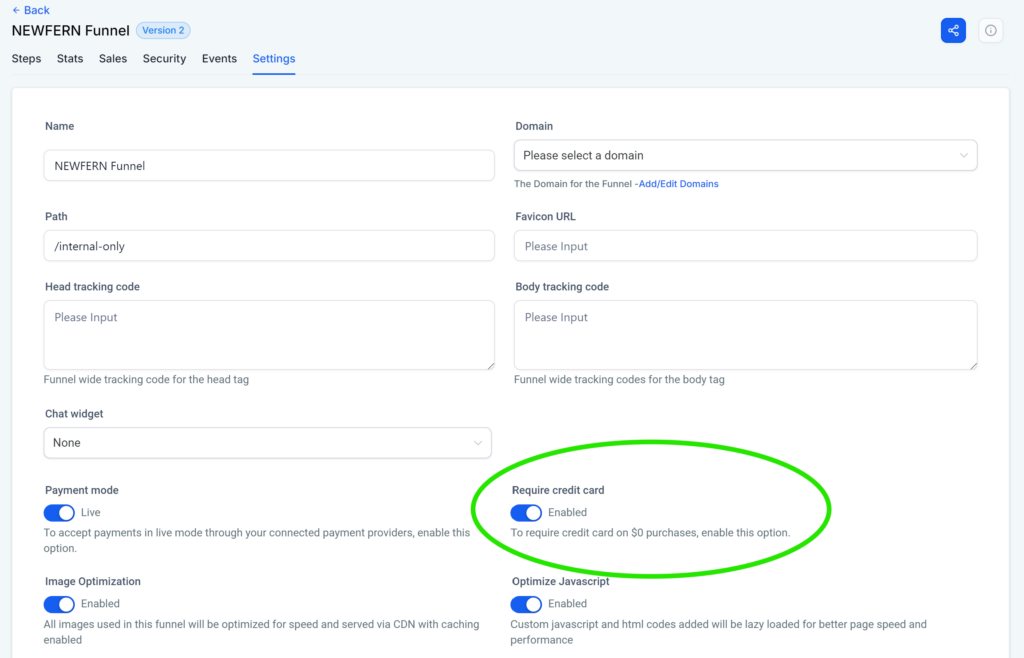
NOTE: There’s a setting in the Funnel Settings that determines whether you still have to add credit card info when using a coupon that makes the sale $0. Make sure it’s toggled the way you like it. For testing purposes, I usually require credit card info so I can test that part of the checkout process. And you definitely want to require card info anytime a coupon makes the main purchase $0 but you’re still hoping they’ll buy the order bump and/or OTO upsells before the end of their purchase.
Testing Stripe by using a “test” credit card number:
Open the funnel you want to test and click on Settings to see the funnel settings.
Find the toggle switch that says Live and toggle it. It will change to Test.
Open your sales page in an incognito/private window and click the button to buy.
Fill out the order form with whatever test info you want (but make sure you use an email address where you can receive emails!)
Then enter the following details for the payment info:
Stripe Test Card Number: 4242 4242 4242 4242
Stripe Test Card Expiration: Any future date – ex. 12/34
Stripe Test Card CVC: Any 3-digit number – ex. 123
Click to buy.
If everything is set up correctly, the order form should work and your Thank You page should load. Any automations you have in place that are triggered by a purchase should fire off. You should receive any emails a real customer would receive and you should be added to any courses or communities a real customer would be added to.